

Spikr guides · Coming soon
How to track volleyball hits with a smartwatch
A volleyball session involves more than steps and calories. Spikr is designed to record the contacts you make with the ball: strikes (spikes and serves), sets and bumps. It uses motion sensors on your hitting wrist, so there is no camera to position beside the court.
What you need
You need a watch running Wear OS 3 or newer with an accelerometer and gyroscope, plus a paired Android phone. Spikr has been tested on Samsung Galaxy Watch 7 and Galaxy Watch5 Pro. Check the watch compatibility guide before planning your setup.
From warm-up to session summary
- Wear the watch on your hitting hand. Spikr reads the movement of the arm that contacts the ball. It works for right-handed and left-handed players, with no setting to change.
- Start a session on the watch. Detection runs on the watch itself, so your phone can stay in your bag while you play.
- Review the feedback. After each hit, the watch shows the hit type and its score for a few seconds, with a short buzz. You can turn the buzz off in the phone app's Settings.
- End the session. The results go to your phone. If it is out of range, the watch keeps them and sends them when the phone is back. Then review the hits, scores and your progress over time on the phone.
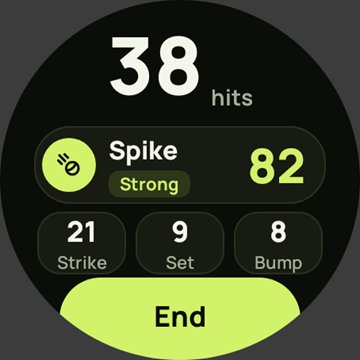
Use the numbers alongside your practice notes
A hit count can help you understand how much you practised. When comparing sessions, note what you were doing: a serving drill and a match naturally create different patterns. Use similar drills and a consistent watch setup to make comparisons more useful.
For spikes and serves, Power describes swing intensity. For sets and bumps, Control describes steadiness around contact. Read what these scores mean before treating a higher number as a better result.
What the watch cannot see
Wrist motion does not show where the ball lands, your full body position or whether a point was won. In testing on players the model had never seen, it identified about 9 out of 10 hits correctly, so it can still miss or misclassify a contact. Spikr provides a training record, rather than a replacement for a coach or video review.
Spikr is coming soon to Google Play. The early-access list is open for players who want launch updates or would like to volunteer for testing.